Tag: python

  • Monitor network endpoints with Python asyncio and aiohttp

    Monitor network endpoints with Python asyncio and aiohttp

    My motivation – I wanted to make a network monitoring service in Python. Python isn’t known for it’s async ability, but with asyncio it’s possible. I wanted to include it in a larger Django app, GlitchTip. Keeping everything as a monolithic code base makes it easier to maintain and deploy. Go and Node handle concurrent IO a little more naturally but don’t have any web framework even close to as feature complete as Django.

    How asyncio works compared to JavaScript

    I’m used to synchronous Python and asynchronous JavaScript. asyncio is a little strange at first. It’s far more verbose than just stringing along a few JS promises. Let’s compare this example of JS and Python.

    fetch('http://example.com/example.json')
      .then(response => response.json())
      .then(data => console.log(data));
    async def main():
        async with aiohttp.ClientSession() as session:
            async with session.get('http://example.com/example.json') as response:
                html = await response.json()
                print(html)
    loop = asyncio.get_event_loop()
    loop.run_until_complete(main())

    There’s more boilerplate in Python. aiohttp has three chained async calls while fetching JSON in JS requires just two chained promises. Let’s break these differences down a bit

    • An async call to GET/POST/etc the resource. At this time, we don’t have the body of the request. fetch vs sessions.get are about the same here.
    • An async call to get the body contents (and perhaps process them in some manner such as converting a JSON payload to a object or dictionary). If we only need say the status code, there is no need to spend time doing this. Both have async text() and json() functions that also work similarly.
    • aiohttp has a ClientSession context manager that closes the connection. The only async IO occurs when closing the connection. It’s possible to reuse a session for some performance benefit. This is often useful in Python as our async code block will often live nested in synchronous code. Fetch does not have this (as far as I’m aware at the time of this writing).
    • get_event_loop and run_until_complete allow us to run async functions from a synchronous code function. Python is synchronous by default, so this is necessary. When running Django or Celery or a python script, everything is blocking until explicitly run async. JavaScript on the lets you run async code with 0 boilerplate.

    One other thing to note is that both Python and JavaScript are single threaded. While you can “do multiple things” while waiting for IO, you cannot use multiple CPU cores without starting multiple processes, for example by running uwsgi workers. Thus in Python it’s called asyncio.

    Source: docs.aiohttp.org

    Network Monitoring with aiohttp

    Network monitoring can easily start as a couple line script or be a very complex, massive service depending on scale. I won’t claim that my method is the best, mega-scale method ever, but I think it’s quite sufficient for small to medium scale projects. Let’s start with requirements

    • Must handle 1 million network checks per minute
    • Must run at least every 30 seconds (smaller scale this could probably go much shorter)
    • Must only run Python and get embedded into a Django code base
    • Must not require anything other than a Celery compatible service broker and Django compatible database

    And a few non-functional requirements that I believe will help scale

    • Must scale to run from many servers (Celery workers)
    • Must batch database writes as efficiently as possible to avoid bottlenecks
    Overview of architecture

    A Celery beat scheduler will run a “dispatch_checks” task every 30 seconds. Dispatch checks will determine which “monitors” need checked based on their set interval frequency and last check. It will then batch these in groups and dispatch further parallel celery tasks called “perform_checks” to actually perform the network check. The perform_checks task will then fetch additional monitor data in one query and asynchronously check each network asset. Once done, it will save to the database using standard Django ORM. By batching inserts, we should be able to improve scalability. It also means we don’t need a massive number of celery tasks, which would be unnecessary overhead. In real life, we may only have a few celery works for the “small or medium scale” so it would waste resources to dispatch 1 million celery tasks. If we batch inserts by 1000 and really have our max target of 1 million monitors, then we would want 1000 celery workers. Another variable is the timeout for each check. Making it lower, means our workers get done faster instead of waiting for the slowest request.

    See the full code on GlitchTip’s GitLab.

    Celery Tasks

    @shared_task
    def dispatch_checks():
        now = timezone.now()
        latest_check = Subquery(
            MonitorCheck.objects.filter(monitor_id=OuterRef("id"))
            .order_by("-start_check")
            .values("start_check")[:1]
        )
        monitor_ids = (
            Monitor.objects.filter(organization__is_accepting_events=True)
            .annotate(
                last_min_check=ExpressionWrapper(
                    now - F("interval"), output_field=DateTimeField()
                ),
                latest_check=latest_check,
            )
            .filter(latest_check__lte=F("last_min_check"))
            .values_list("id", flat=True)
        )
        batch_size = 1000
        batch_ids = []
        for i, monitor_id in enumerate(monitor_ids.iterator(), 1):
            batch_ids.append(monitor_id)
            if i % batch_size == 0:
                perform_checks.delay(batch_ids, now)
                batch_ids = []
        if len(batch_ids) > 0:
            perform_checks.delay(batch_ids, now)
    
    @shared_task
    def perform_checks(monitor_ids: List[int], now=None):
        if now is None:
            now = timezone.now()
        # Convert queryset to raw list[dict] for asyncio operations
        monitors = list(Monitor.objects.filter(pk__in=monitor_ids).values())
        loop = asyncio.get_event_loop()
        results = loop.run_until_complete(fetch_all(monitors, loop))
        MonitorCheck.objects.bulk_create(
            [
                MonitorCheck(
                    monitor_id=result["id"],
                    is_up=result["is_up"],
                    start_check=now,
                    reason=result.get("reason", None),
                    response_time=result.get("response_time", None),
                )
                for result in results
            ]
        )
    

    The fancy Django ORM subquery is to ensure we are able to determine which monitors need checked while being as performant as possible. While some may prefer complex queries in raw SQL, for some reason I prefer ORM and I’m impressed to see how many use cases Django can cover these days. Anything to avoid writing lots of join table SQL 🤣️

    aiohttp code

    async def process_response(monitor, response):
        if response.status == monitor["expected_status"]:
            if monitor["expected_body"]:
                if monitor["expected_body"] in await response.text():
                    monitor["is_up"] = True
                else:
                    monitor["reason"] = MonitorCheckReason.BODY
            else:
                monitor["is_up"] = True
        else:
            monitor["reason"] = MonitorCheckReason.STATUS
    
    async def fetch(session, monitor):
        url = monitor["url"]
        monitor["is_up"] = False
        start = time.monotonic()
        try:
            if monitor["monitor_type"] == MonitorType.PING:
                async with session.head(url, timeout=PING_AIOHTTP_TIMEOUT):
                    monitor["is_up"] = True
            elif monitor["monitor_type"] == MonitorType.GET:
                async with session.get(url, timeout=DEFAULT_AIOHTTP_TIMEOUT) as response:
                    await process_response(monitor, response)
            elif monitor["monitor_type"] == MonitorType.POST:
                async with session.post(url, timeout=DEFAULT_AIOHTTP_TIMEOUT) as response:
                    await process_response(monitor, response)
            monitor["response_time"] = timedelta(seconds=time.monotonic() - start)
        except SSLError:
            monitor["reason"] = MonitorCheckReason.SSL
        except asyncio.TimeoutError:
            monitor["reason"] = MonitorCheckReason.TIMEOUT
        except OSError:
            monitor["reason"] = MonitorCheckReason.UNKNOWN
        return monitor
    
    async def fetch_all(monitors, loop):
        async with aiohttp.ClientSession(loop=loop) as session:
            results = await asyncio.gather(
                *[fetch(session, monitor) for monitor in monitors], return_exceptions=True
            )
            return results

    That’s it. Ignoring my models and plenty of Django boilerplate, we have the core of a reasonably performant uptime monitoring system in about 120 lines of code. GlitchTip is MIT licensed so feel free to use as you see fit. I also run a small SaaS service at app.glitchtip.com which helps fund development.

    On testing

    I greatly prefer testing in Python over JavaScript. I’m pretty sure this 15 line integration test would require a pretty complex Jasmine boilerplate and run about infinite times slower in CI. I will gladly put up with some asyncio boilerplate to avoid testing anything in JavaScript. In my experience, there are Python test driven development fans and there are JS developers who intended to write tests.

        @aioresponses()
        def test_monitor_checks_integration(self, mocked):
            test_url = "https://example.com"
            mocked.get(test_url, status=200)
            with freeze_time("2020-01-01"):
                mon = baker.make(Monitor, url=test_url, monitor_type=MonitorType.GET)
            self.assertEqual(mon.checks.count(), 1)
    
            mocked.get(test_url, status=200)
            with freeze_time("2020-01-01"):
                dispatch_checks()
            self.assertEqual(mon.checks.count(), 1)
    
            with freeze_time("2020-01-02"):
                dispatch_checks()
            self.assertEqual(mon.checks.count(), 2)

    There’s a lot going on in little code. I use aioresponses to mock network requests. Django baker to quickly generate DB test data. freezegun to simulate time changes. assertEqual from Django’s TestClient. And not seen, CELERY_ALWAYS_EAGER in settings.py to force celery to run synchronously for convenience. I didn’t write any async tests code yet I have a pretty decent test covering the core functionality from having monitors in the DB to ensuring they were checked properly.

    JS equivalent

    describe("test uptime", function() {
      it("should work", function() {
        // TODO
      });
    });

    Joking aside, I find it quite hard to find a good Node based task runner like Celery, ORM, and test framework that really work well together. There are many little niceties like running Celery in always eager mode that make testing a joy in Python. Let me know in a comment if you disagree and have any JavaScript based solutions you like.
  • Angular Wagtail 1.0 and getting started

    Angular Wagtail and Wagtail Single Page App Integration are officially 1.0 and stable. It’s time for a more complete getting started guide. Let’s build a new app together. Our goal will be to make a multi-site enabled Wagtail CMS with a separate Angular front-end.  When done, we’ll be set up for features such as

    • Map Angular components to Wagtail page types to build any website tree we want from the CMS
    • All the typical wagtail features we expect, drafts, redirects, etc. No compromises.
    • SEO best practices including server side rendering with Angular Universal, canonical urls, and meta tags.
    • Correct status codes for redirects and 404 not found
    • Lazy loaded modules
    • High performance, cache friendly, small JS bundle size (In my experience 100kb – 270kb gzipped for large scale apps)
    • Absolutely no jank. None. When a page loads we get the full page. Nothing “pops in” unless we want it to. No needless dom redraws that you may see with some single page apps.
    • Scalable – add more sites, add translations, keep just one “headless” Wagtail instance to manage it all.

    Start with a Wagtail project that has wagtail-spa-integration added. For demonstration purposes, I will use the sandbox project in wagtail-spa-integration with Docker. Feel free to use your own Wagtail app instead.

    1. git clone https://gitlab.com/thelabnyc/wagtail-spa-integration.git
    2. Install docker and docker-compose
    3. docker-compose up
    4. docker-compose run –rm web ./manage.py migrate
    5. docker-compose run –rm web ./manage.py createsuperuser
    6. Go to http://localhost:8000/admin/ and log in.

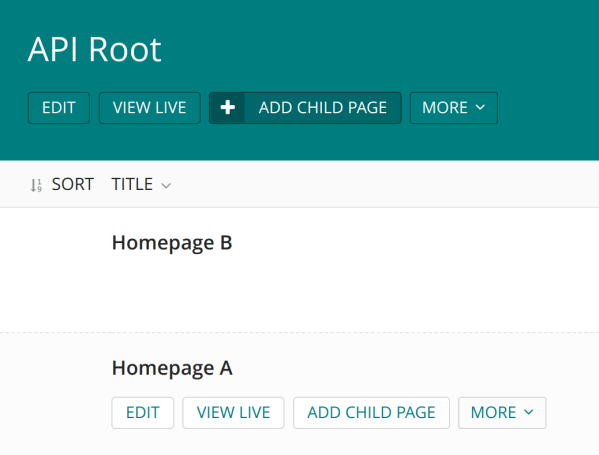
    Set up Wagtail Sites. We will make 1 root page and multiple homepages representing each site.
    Screenshot from 2019-10-20 12-08-46

    You may want to rename the “Welcome to Wagtail” default page to “API Root” just for clarity. Then create two child pages of any type to act as homepages. If you don’t need multi-site support, just add one instead. Wagtail requires the Sites app to be enabled even if only one site is present. The API Root will still be important later on for distinguishing the Django API server from the front-end Node server.

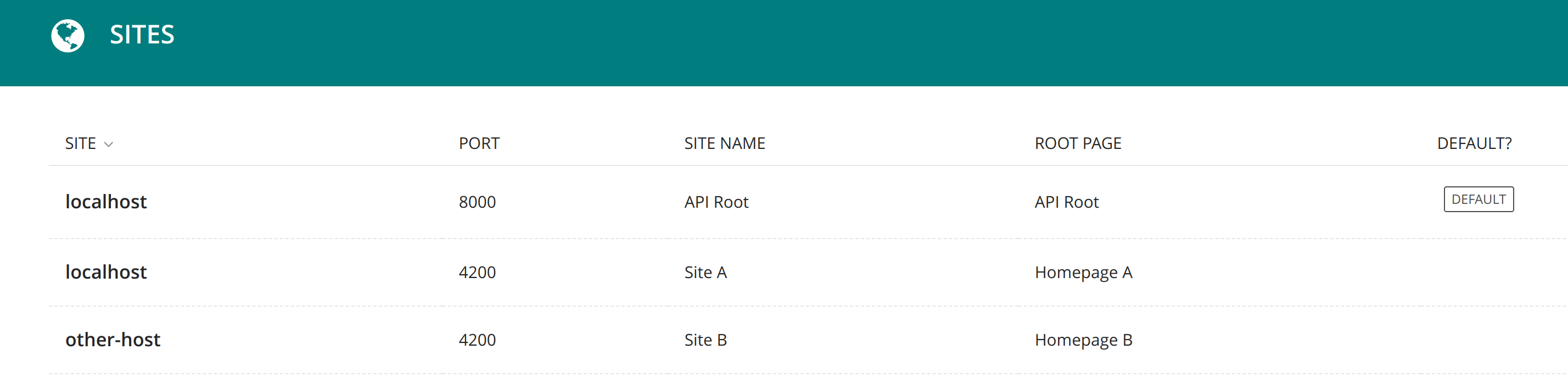
    Next head over to Settings, Sites. Keep the default Site attached to the API Root page. Add another Site for each homepage. If you intend to have two websites, you should have three Wagtail Sites (API Root, Site A, Site B). Each hostname + port combination must be unique. For local development, it doesn’t matter much. For production you may have something like api.example.com, http://www.example.com, and intranet.example.com.

    Screenshot from 2019-10-20 15-13-39

    Next let’s set up the Wagtail API. This is already done for you in the sandbox project but when integrating your own app, you may follow the docs here. Then follow Wagtail SPA Integration docs to set up the extended Pages API. Make sure to set WAGTAILAPI_BASE_URL to localhost:8000 if you want to run the site locally on port 8000. Here’s an example of setting up routes.

    api.py

    from wagtail.api.v2.router import WagtailAPIRouter
    from wagtail_spa_integration.views import SPAExtendedPagesAPIEndpoint
    
    api_router = WagtailAPIRouter('wagtailapi')
    api_router.register_endpoint('pages', SPAExtendedPagesAPIEndpoint)

    urls.py

    from django.conf.urls import include, url
    from wagtail.core import urls as wagtail_urls
    from wagtail_spa_integration.views import RedirectViewSet
    from rest_framework.routers import DefaultRouter
    from .api import api_router
    
    router = DefaultRouter()
    router.register(r'redirects', RedirectViewSet, basename='redirects')
    
    urlpatterns = [
        url(r'^api/v2/', api_router.urls),

    Test this out by going to localhost:8000/api/ and localhost:8000/api/v2/pages/

    If you’d like to enable the Wagtail draft feature – set PREVIEW_DRAFT_CODE in settings.py to any random string. Note this feature will generate special one time, expiring links that do not require authentication to view drafts. This is great for sharing and the codes expire in one day. However if your drafts contain more sensitive data, you may want to add authentication to the Pages API. This is out of scope for Wagtail SPA Integration, but consider using any standard Django Rest Framework authentication such as tokens or JWT. You may want to check if a draft code is present and only check authentication then, so that the normal pages API is public.

    Angular Front-end

    Now let’s add a new Angular app (or modify an existing one).

    1. ng new angular-wagtail-demo
    2. cd angular-wagtail-demo
    3. npm i angular-wagtail –save

    In app.module.ts add

    import { WagtailModule } from 'angular-wagtail';
    WagtailModule.forRoot({
      pageTypes: [],
      wagtailSiteDomain: 'http://localhost:8000',
      wagtailSiteId: 2,
    }),

    In app-routing.module.ts add

    import { CMSLoaderGuard, CMSLoaderComponent } from 'angular-wagtail';
    const routes: Routes = [{ path: '**', component: CMSLoaderComponent, canActivate: [CMSLoaderGuard] }];

    This is the minimal configuration. Notice the domain and site ID are set explicitly. This is not required as Wagtail can determine the appropriate site based on domain. However, it’s much easier to set it explicitly so that we don’t have to set up multiple hostnames for local development. Next let’s add a lazy loaded homepage module. Making even the homepage lazy loaded will get us in the habit of making everything a lazy loaded module which improves performance for users who might not visit the homepage first (Such as an ad or search result to a specific page).

    ng generate module home --routing
    ng generate component home

    In app.module.ts add a “page type”. An Angular Wagtail page type is a link between Wagtail Page Types and Angular components. If we make a Wagtail page type “cms_django_app.HomePage” we can link it to an Angular component “HomeComponent”. Page types closely follow the Angular Router, so any router features like resolvers will just work with exactly the same syntax. In fact, angular-wagtail uses the Angular router behind the scenes.

    pageTypes: [
      {
        type: 'sandbox.BarPage',
        loadChildren: () => import('./home/home.module').then(m => m.HomeModule)
      },
    ]

    This maps sandbox.BarPage from the wagtail-spa-integration sandbox to the HomeModule. “sandbox” is the django app name while BarPage is the model name. This is the same syntax as seen in the Wagtail Pages API and many other places in django to refer to a model (app_label.model). “loadChildren” is the same syntax as the Angular Router. I could set the component instead of loadChildren if I didn’t want lazy loading.

    Next edit home/home-routing.module.ts. Since our homepage has only one component, set it to always load that component

    home-routing.module.ts with WagtailModule.forFeature

    const routes: Routes = [{
      path: '',
      component: HomeComponent
    }];

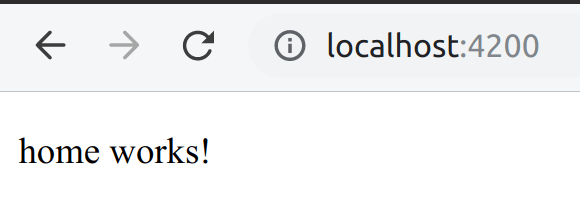
    To test everything is working run ​”npm start” and go to localhost:4200.

    Screenshot from 2019-10-20 14-47-23

    We now have a home page! However, it doesn’t contain any actual CMS data. Let’s start by adding the page’s title. We could get this data on ngOnInit however this would load the data asynchronously after the route is loaded. This can lead to jank because any static content would load immediately on route completion but async data would pop in later. To fix this, we’ll use a resolver. Resolvers can get async data before the route completes.

    Edit home-routing.module.ts

    import { GetPageDataResolverService } from 'angular-wagtail';
    const routes: Routes = [{
      path: '',
      component: HomeComponent,
      resolve: { cmsData: GetPageDataResolverService }
    }];

    This resolver service will assign an Observable with the CMS data for use in the component. We can use it in our component:

    home.component.ts

    import { ActivatedRoute } from '@angular/router';
    import { Observable } from 'rxjs';
    import { map } from 'rxjs/operators';
    import { IWagtailPageDetail } from 'angular-wagtail';
    
    interface IHomeDetails extends IWagtailPageDetail {
      extra_field: string;
    }
    
    @Component({
      selector: 'app-home',
      template: `
        <p>Home Works!</p>
        <p>{{ (cmsData$ | async).title }}</p>
      `,
    })
    export class HomeComponent implements OnInit {
      public cmsData$: Observable<IHomeDetails>;
    
      constructor(private route: ActivatedRoute) { }
    
      ngOnInit() {
        this.cmsData$ = this.route.data.pipe(map(dat => dat.cmsData));
      }
    }

    Going top to bottom, notice how IHomeDetails extends IWagtailPageDetail and adds page specific fields. This should mimic the fields you added when defining the Wagtail Page model. Default Wagtail fields like “title” are included in IWagtailPageDetail.

    The template references the variable cmsData$ which is an Observable with all page data as given by the Wagtail Pages API detail view.

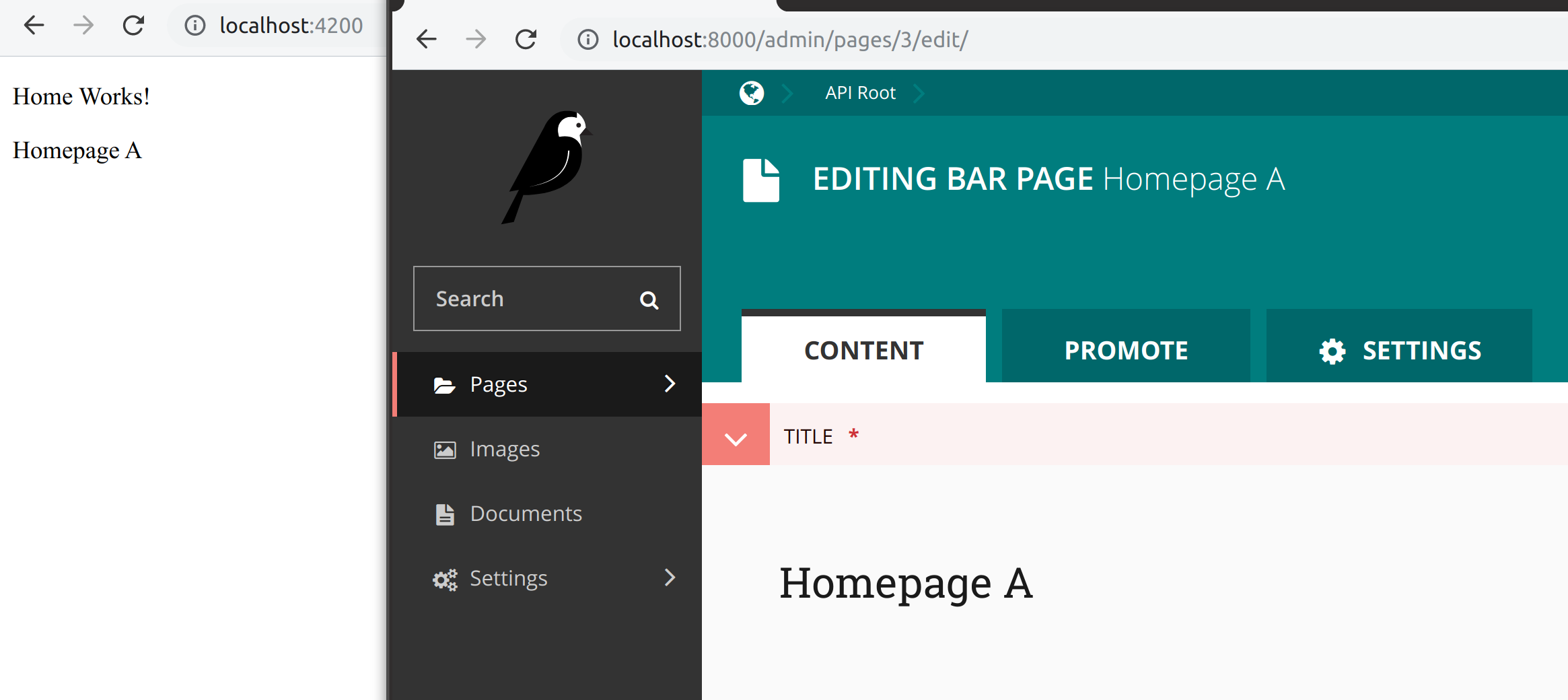
    ngOnInit is where we set this variable, using route.data. Notice how cmsData is available from the resolver service. When you load the page, you should notice “Home Works!” and the title you set in the CMS load at the same time. Nothing “pops in” which can look bad.

    Screenshot from 2019-10-20 15-15-59.png

    At this point, you have learned the basics of using Angular Wagtail!

    Adding a lazy loaded module with multiple routes

    Sometimes it’s preferable to have one module with multiple components. For example, there may be 5 components and two of them represent route-able pages. Keeping them grouped in a module increases code readability and makes sense to lazy load the components together. To enable this, make use of WagtailModule.forFeature. Let’s try making a “FooModule” example to demonstrate.

    ng generate module foo
    ng generate component foo

    Edit foo.module.ts

    import { NgModule, ComponentFactoryResolver } from '@angular/core';
    import { CommonModule } from '@angular/common';
    import { WagtailModule, CoalescingComponentFactoryResolver } from 'angular-wagtail';
    import { FooComponent } from './foo.component';
    
    @NgModule({
      declarations: [FooComponent],
      entryComponents: [FooComponent],
      imports: [
        CommonModule,
        WagtailModule.forFeature([
          {
            type: 'sandbox.FooPage',
            component: FooComponent
          }
        ])
      ]
    })
    
    export class FooModule {
      constructor(
        coalescingResolver: CoalescingComponentFactoryResolver,
        localResolver: ComponentFactoryResolver
      ) {
        coalescingResolver.registerResolver(localResolver);
      }
    }

    FooComponent is added to both declarations and entryComponents as it’s not directly added to the router. WagtailModule.forFeature will link the wagtail page type with a component. You can also add a resolver here if needed. Lastly, the constructor adds coalescingResolver. This enabled dynamic component routing between modules and likely won’t be needed in Angular 9 with Ivy and future versions of Angular Wagtail.

    Add as many types of page types as desired.

    Angular Universal

    Angular Universal can generate pages in Node (or prerender them). This is nice for SEO and general performance. The effect is to generate a minimalist static view of the page that runs without JS enabled. Later the JS bundle is loaded and any dynamic content (shopping carts, user account info) is loaded in. Because the server side rendered static page is always the same for all users, it works great with a CDN. I’ve found even complex pages will be around 50kb of data for the first dom paint. Installation is easy.

    ng add @nguniversal/express-engine --clientProject angular.io-example

    Compile with npm run build:ssrand serve with npm run serve:ssr​. Angular Wagtail supports a few environment variables we can set in node. Setting the API server domain and site per deployment is possible:

    export WAGTAIL_SITE_ID=2
    export CMS_DOMAIN=http://localhost:8000

    Confirm it’s working by disabling JavaScript in your browser.

    Angular Wagtail provides a few extras for Angular Universal when run in Node (serve:ssr). You can return 404, 302, and 301 status codes by editing server.ts as documented. You can also add the wagtail generated sitemap. Not directly related to Wagtail, but I found helmet and adding a robots.txt pretty helpful too. Angular Univeral just runs express, so anything possible in express is possible in Angular Universal.

    Bells and whistles – not found and more SEO

    For a real site, consider adding a 404 not found component, setting page meta tags and canonical url. Edit the WagtailModule.forRoot configuration to modify this however you wish. If you followed the server set up from above then Wagtail redirects and drafts should “just work”. Any time Angular Wagtail can’t match a url path to component, it will query the Wagtail SPA Integration redirects API and will redirect if it finds one. If not, Angular Wagtail will show the 404 not found component to the user.

    You can find the full angular wagtail demo source on gitlab.

  • More uno reports

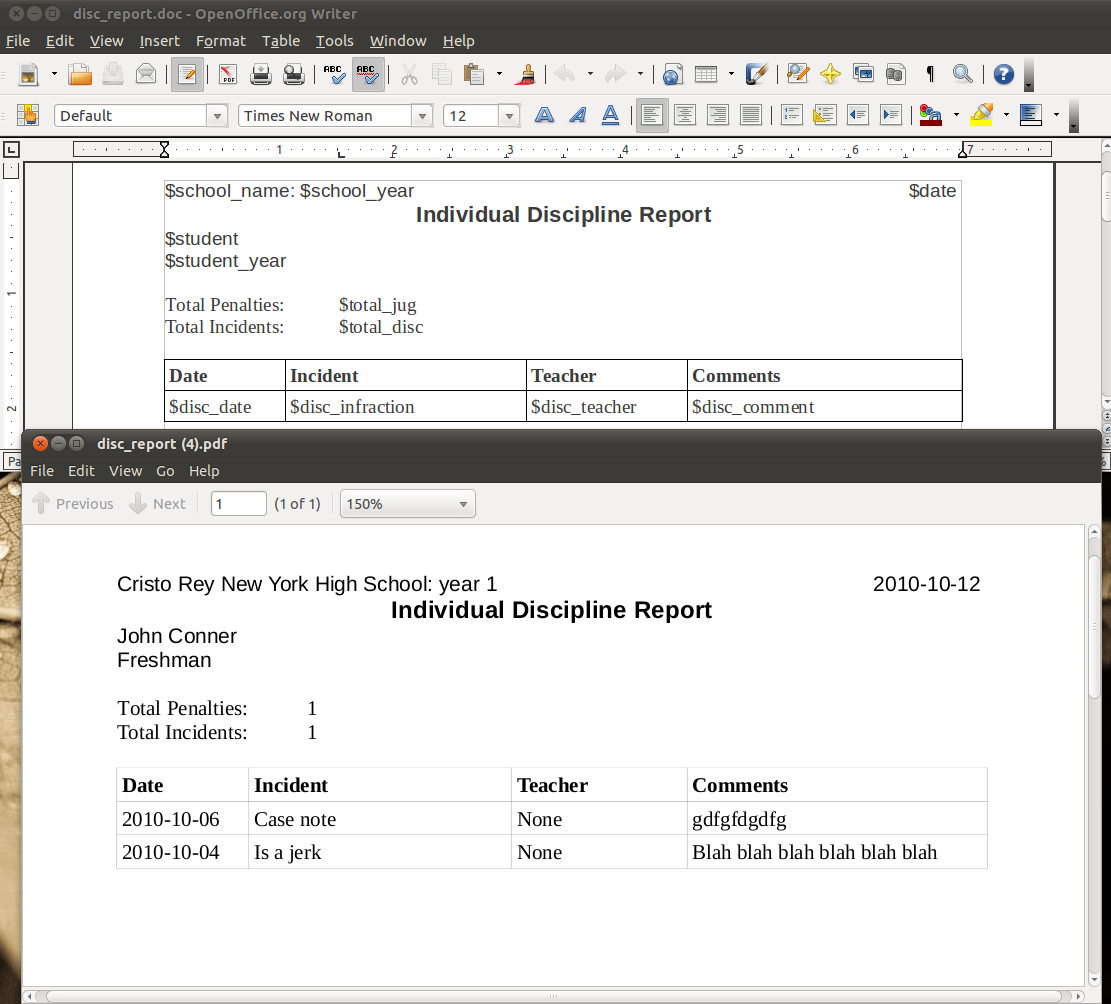
    I’ve been playing around more with openoffice.org’s uno api for making reports. Since I’ll be making more updates I’ll just post a link to the Google Code site

    http://code.google.com/p/student-worker-relational-database/source/browse/#svn/trunk/ecwsp/uno_report

    My latest improvement is supporting tables. It’s probably best to just show what it does.

    Now a user could just download the report, change fonts, layout, etc, and reupload it. It does have it’s limitations and is a work in progress but it’s already pretty cool. As a developer I can just define what variables can be used and let someone else make the report (and change it around later). To use it you just have to make the proper data structures, so really this could be ported to any data driven application, not just Django.

  • Django Hack: adding extra data to admin interface

    A common need I have for Django’s admin interface is to show a little more data for convenience right on the edit page. For example showing a link to a foreign key’s edit page right there. The way I do this is by setting the help_text field in the render_change_form function. I create a new function in my admin class to override render_change_form

    class whateverAdmin(admin.modelAdmin):
     def render_change_form(self, request, context, *args, **kwargs):
      context['adminform'].form.fields['someField'].help_text = "Go to edit page " + str(context['original'].anyFunction()) + " (will discard changes)"
      return super(whateverAdmin, self).render_change_form(request, context, args, kwargs)

    the anyFunction() is just a function I made to display a URL in my model. Notice the allow_tags line to allow the function to return the html <a> tag

    def anyFunction(self):
     try:
      field = self.someField
      urlRes = urlresolvers.reverse('admin:appName_someField_change', args=(field.id,))
      return '</a><a href="http://example.com' + urlRes + '">' + str(field) + '</a>'
     except:
     return ""
    anyFunction.allow_tags = True

    This link is then very convenient when using the admin interface just to look up information. The render_change_from function is also useful to editing about the admin page. I use it to modify queryset’s for foreign key data as well.

  • Django

    I mentioned the Django app I made in the previous post so I thought I would provide some info about what it is. Essentially the goal was to reduce duplicate work everywhere possible be moving data from spreadsheets and other database’s into one central database. Also to allow a non skilled worker to edit this data, then allow for reporting to remake all the excel sheets that were originally needed. Here’s my setup

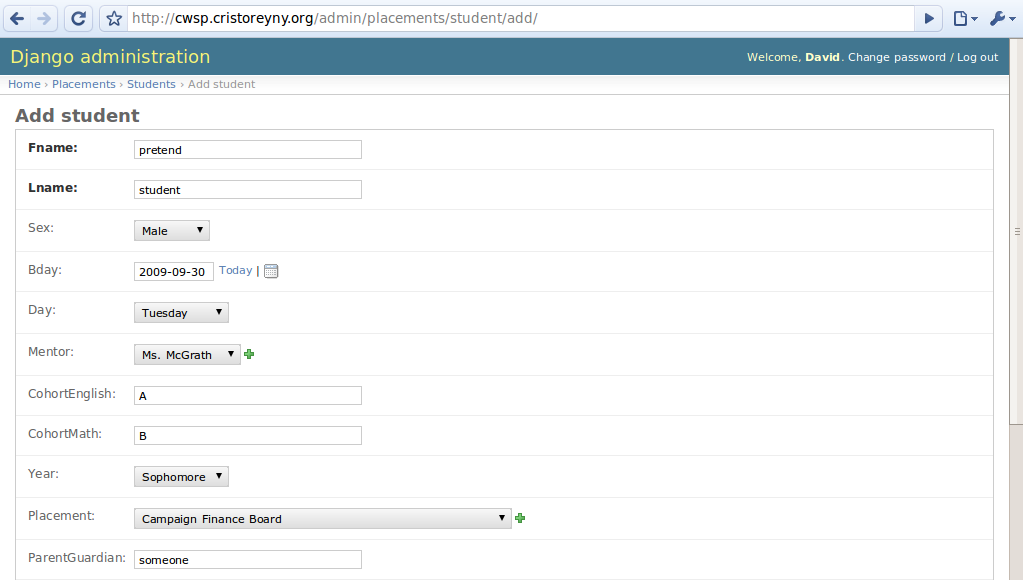
    Ubuntu 9.04 server running Django, MySQL, and Apache (LAMD?) Data models are defined in Django which automatically makes an Admin interface with some customization options.

    data entry

    Django also makes short work of authentication with is done against Active Directory. Reporting is done with PyExcelerator and pyRTF to make downloadable excel and rtf documents.

    reporting

    It’s a pretty basic database but it really saves a lot of time compared to maintaining lots of xls documents and mail merges. Also it allows a technical worker to import exported data from other database into MySQL. Ideally this program could also be linked with other MySQL backend programs. So say I want to use SugarCRM I could symlink the contacts table so both Sugar and Django use the same one for perfect 2-way syncing. The real beauty of this is that it was so quick to develop. This is just been a side project for me. Doing it in PHP or .NET would have easily taken 3 times as long.

  • Working away

    Well I’ve been in nyc for a month now. The first few weeks have been hell with 60+ hour weeks at Cristo Rey but things are finally starting to calm down. At work I’m coordinating transportation for students to get to their work placements.

    I’ve completely redid the process in a short time I was there from a bunch of random Excel files and proprietary databases to something more maintainable, a MySQL database with Django. I’m impressed with Django’s ability allow me to make good data centric websites in only a few days. Django’s philosophy of defining data “models” once and having it create the database and administration page automatically is great. I’m then using pyRTF and pyExcelerator to generate reports from the data. We can now enter student, company, and contact data in at one place and have it reflect to all relevant reports such as daily attendance. The admin interface is easy enough to use that students can do data entry with it.

    Other new fronts include the possibility of moving from Act by Sage to SugarCRM should further streamline the process. The idea here would be that Sugar has more features and could integrate with my Django database, Outlook, and a smart phone. With some hacking around it looks like I can symlink(yay unix) a “contacts” table used in both Django and SugarCRM to keep them perfectly synced and keep Django happy in it’s data model land without manual SQL needed. I’m happy to be using my skills at the new placement, while also running the day to day activities at the school. Though it’s still a 10+ hour day with some Saturdays making it rather stressful.

    Other thing’s I’m looking into are Alfresco content management system, Zimba email server, and SchoolTool. SchoolTool is a decent school administration management tool. It’s written in Zope which is a python based framework. Python is quickly becoming my favorite language. It’s missing a few key features so I might hack on it to make it work. One unsolvable(?) problem with SchoolTool is that it uses ZODB, an object oriented database. This means it would be really hard to integrate it with the other databases I’m using. ln -s can’t save me this time..