Blog

  • Recipe: Better Than Grandma’s Mac and Cheese

    Well a long time ago I said I would include a few recipes just for fun so here it goes.

    Mac and Cheese

    ready for some mac and cheese

    Everyone loves it, it costs little to make, and it’s easy to make in bulk. There’s a million ways to make it, mine’s the best.

    • Noodles (doesn’t even need to be Marconi anything small will do)
    • Onions
    • Cheese (Cheddar, maybe a blend with some others)
    • Milk
    • Flour
    • Beer
    • Butter
    • Breadcrumbs

    Boil the noodles, leave them a little underdone. Make a while sauce. There’s plenty of recipes for this basically you just melt butter, then mix in milk and flour and simmer (or add more flour) till it’s the desired consistency. Sauté the onions in olive oil (or anything). You could also throw in other vegies such as peppers, leeks, and tomato. If you have a large enough baking dish you can just mix everything in there, otherwise use a bowl first. Mix the noodles, white sauce, beer (dark or light each gives a very different but great flavor), onions and 3/4 of your cheese. Sprinkle breadcrumbs and remaining cheese on top once it’s in the baking dish. Bake at 350 until the cheese and breadcrumbs starts to turn brown.

    You’re notice I didn’t include quantities. You should know what mac and cheese is supposed to look like. The now cheesy white sauce shouldn’t be water nor a solid that doesn’t mix. More beer and milk will make it runnier while cheese and flour will make it more solid. Enjoy, grab a beer, and get back to coding!

  • Spreadsheet reporting in Django

    It’s often desired to quickly export data in a generic method that takes little coding. There are already some solutions for this. I didn’t like any however as they ignore  many to many fields. One could argue a more robust system might be needed when handling more complex reports with gui sql query builders and such. Screw that here’s a hack to get the job 95% done.

    I want to check off fields in Django Admin’s model list display. Then make an action to make a spreadsheet report, not some crap csv.

    Here is my hack function to take a model and query set and spit out an .xls file

    def admin_export_xls(request, app, model, qs=None):
        """ Exports a model to xls.
        qs: optional queryset if only exporting some data"""
        mc = ContentType.objects.get(app_label=app, model=model).model_class()
        wb = xlwt.Workbook()
        ws = wb.add_sheet(unicode(mc._meta.verbose_name_plural))
        #for i, f in enumerate(mc._meta.fields):
        #    ws.write(0,i, f.name)
        # Lets get all fields names, even m2m
        for i, field in enumerate(mc._meta.get_all_field_names()):
            ws.write(0,i, field)
        if not qs:
            qs = mc.objects.all()
    
        for ri, row in enumerate(qs):
            for ci, f in enumerate(mc._meta.get_all_field_names()):
                try:
                    # terrible way to detect m2m manager
                    if unicode(getattr(row, f))[1:51] == 'django.db.models.fields.related.ManyRelatedManager':
                        # If it's a M2M relationship, serialize it and throw it in one cell.
                        value = ""
                        for item in getattr(row, f).all():
                            value += unicode(item) + ", "
                        value = value[:-2]
                        ws.write(ri+1, ci, value)
                    else:
                        ws.write(ri+1, ci, unicode(getattr(row, f)))
                except:
                    # happens when the m2m is has an appended _set. This is a hack that works sometimes, it sucks I know
                    try:
                        f += "_set"
                        value = ""
                        for item in getattr(row, f).all():
                            value += unicode(item) + ", "
                        value = value[:-2]
                        ws.write(ri+1, ci, value)
                    except:
                        ws.write(ri+1, ci, "")
        fd, fn = tempfile.mkstemp()
        os.close(fd)
        wb.save(fn)
        fh = open(fn, 'rb')
        resp = fh.read()
        fh.close()
        response = HttpResponse(resp, mimetype='application/ms-excel')
        response['Content-Disposition'] = 'attachment; filename=%s.xls' % 
              (unicode(mc._meta.verbose_name_plural),)
        return response
    

    That will serialize manytomany fields to comma separated fields all in one cell. Next in you need an admin aciton.

    def export_selected_objects(modeladmin, request, queryset):
        app = queryset[0]._meta.app_label
        model = queryset[0]._meta.module_name
        return admin_export_xls(request, app, model, queryset)
    export_selected_objects.short_description = "Export selected items to XLS"
    

    You can see I made mine global. It works on all models. For this to work well you need to make sure your unicode representations of your models are useful. The most common thing I run into are phone numbers. A person can have unlimited phone numbers. The end user will assume a report of people will include this. I make my number’s unicode something like “Cell: 555-555-5555”.

    Of course this code isn’t perfect and there are many times a more robust solution will be needed. What if you want a report of companies with contacts at the company and phone numbers of each contact. At that point you need to generate a query that can get such data and that’s going to take some gross gui query builder program or custom reports by you the developer.

  • Looking for a graphic designer intern

    Looking for some help on my student information system SWORD. Fixing up the user interface and making a marketing website.

    Required
    HTML and CSS by hand
    Previous work example

    Ideal
    Experience with version control system
    Experience with HTML template framework such as Django’s template language
    Experience with user interface design for business applications
    Experience in open source
    Desire to compete with and take down companies who have people pay for their 30 year old software

    The pay is…cheap. Like $8/hr for a couple months or the summer. Might be good for a student, maybe I could even put together the paperwork to call it an internship. Could pay some % of revenue made from this. Everything would be done remotely with your own equipment, except servers which I could provide. You would be working directly for me as a contractor for a limited amount of time (unless it suddenly starts making a lot of money).

    If interested email david @ this website’s domain or comment. Submit a resume and example work.

  • CAS in SugarCRM

    It’s possible to use Jasig CAS for SugarCRM Authentication.

    First install CAS PHP then in your sugar install go to modules/Users/authentication and place CASAuthenticate. I hard coded my server settings in so make sure to edit the files for your purposes. Edit – you can get a nicer version here on github.

    Then edit config.php add

    'authenticationClass' => 'CASAuthenticate',

    to $sugar_config = array

    SugarCRM is supposed to support SAML but I haven’t been able to make it work.

  • SWORD propaganda

    I put together some screenshots to show off SWORD, the open source student worker database.

  • Google Web Store

    Google web store is out, it’s just a bunch of links to websites. Really it does just about nothing. I love it! Why? Despite doing nothing at all, companies like the New York Times and NPR are making nice HTML 5, CSS3 websites. By targeting the “web store” they can ignore non standards compliant browsers. The sites are often much better and because they are just web links many of them run in Firefox and Opera. I did have some trouble loading the NPR app in Firefox though. Hopefully Firefox 4 and their web store will solve this. Anything that pushed companies to make nicer standards compliant websites is good in my opinion.

    The web store does have one feature,  users can rate “apps” and the better apps can get featured.

  • Better report writing with the Appy framework

    Awhile ago I mentioned using openoffice’s pyuno to create reports. I wanted to insert some variables right in a word file so that end users could customize reports themselves. Well it seems Appy POD does just this. While it doesn’t support ods as my little project does it’s far better in every other way. For one it doesn’t require openoffice.org unless you want to convert the document, making it way faster. It also pushes a lot of report writing work to openoffice (or any office program that can do track changes). This makes for more end user flexibility, at the expense of ease of use. I can easily pass pod Django model instances and pod will render them. In my word document I can just add

    student.fname

    to render some student instance’s name. You can even put python code in the document for loops and such (do row for x in many_xs can make a new row for each of your objects). Of course with such flexibility comes a sharper learning curve. You have to put python code in track changes, comments, or fields. While it looks nice to view, making the report can be frustrating. I made an openoffice extension to make it easier to add fields, just install then click tools, addons, insert field. One could also place this in a toolbar or keyboard shortcut for even easier access.

    Insert Field Openoffice Extension

    Appy POD is certainly worth looking into for anyone looking to do customizable report writing. It’s like Django’s templating system but for the word processor.

  • What’s missing in Linux today

    Seems like there’s always a new article about Linux rising to the top or failing. Year of the Linux Desktop, Linux has no market share and never will, etc, etc. Its seems that Linux both has solved every possible problem and has 110% market share while also having 0% market share and useless. Here are my thoughts on Linux being used to replace Windows in the enterprise based on my experience with it.

    Wifi, still trouble (try using certain Ralink cards) but manageable and rarely a problem.

    Office productivity is fine. OpenOffice LibreOffice (this name sucks but so does oracle so I’m divided) works. MS Office runs in wine but expect to pay for a commercial wine if you want multi user support. No serious issues here.

    Printing, some just don’t work. But I’ve rarely encountered this. Many take some effort to work, but nothing beyond an entry level sys admin. Good enough for me.

    LDAP support. If you’ve read this blog before you know there’s major issues here. It can be done. But with limitations. For example Windows lets you select your domain. You try and log in to a domain it waits for the domain to come up then you log in. You select local machine and it just does it without the need to wait. Linux….well nothing similar. I use Centrify Express but I have to choose between waiting (a long time at boot) for the domain connection to be made or just ignoring it and getting authentication errors (if credentials aren’t cached) when the computer is still connecting to the network and the domain. People expect this stuff to just work, since 2000 at least. A decade later and Linux can’t do it seamlessly.

    File shares. Simple smb or nfs is easy yes. Want to put your home on nfs? Fine. WHO DOES THAT? It’s 2010 everyone uses laptops. People take the laptop outside and the home folder drops? This is not acceptable. I’m writing off NFS as useless on desktop computing. Windows deals with this with folder redirection. Your share folders act like mounted network drives until they are synced locally. When back online files get synced to the network. It just works as they say. I am looking into an old program called unison which seems to be able to sync folders. Also there is a program called sparkleshare that’s still in development that looks promising.  Both of these would give you Dropbox-esk sync functionality. That’s nice but still Windows does it better.

    Application compatibility. This one probably puts off a lot of people. I actually think Linux is good here, of course I speak only from my own experience. My thinking today is where is not IS there a Linux version. There are notable exceptions that I simply don’t use. My biggest complaint here is that people need to make deb and rpm packages for their stuff. Seriously if you can afford to make some stupid custom install you can afford to make a package instead. Games are an exception but I’m talking about using Linux for enterprise desktops not personal.

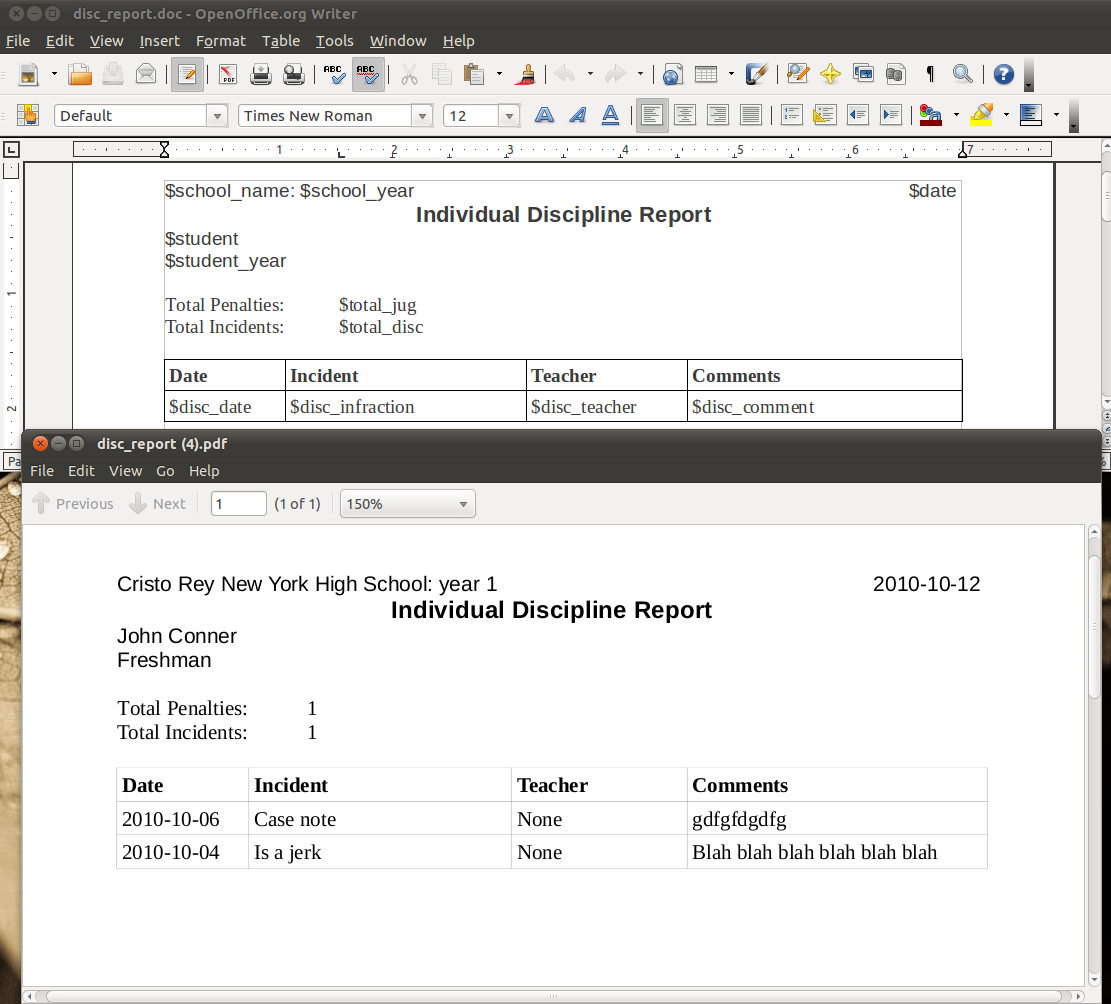
  • More uno reports

    I’ve been playing around more with openoffice.org’s uno api for making reports. Since I’ll be making more updates I’ll just post a link to the Google Code site

    http://code.google.com/p/student-worker-relational-database/source/browse/#svn/trunk/ecwsp/uno_report

    My latest improvement is supporting tables. It’s probably best to just show what it does.

    Now a user could just download the report, change fonts, layout, etc, and reupload it. It does have it’s limitations and is a work in progress but it’s already pretty cool. As a developer I can just define what variables can be used and let someone else make the report (and change it around later). To use it you just have to make the proper data structures, so really this could be ported to any data driven application, not just Django.

  • LED lighting

    I’ve recently purchased some LED lighting to see how it is. LED lights are more energy efficient and last much longer than CLF lights. That also don’t contain mercury and are very durable. I went with four of these

    http://rcm.amazon.com/e/cm?lt1=_blank&bc1=000000&IS2=1&nou=1&bg1=FFFFFF&fc1=000000&lc1=0000FF&t=sunparrid-20&o=1&p=8&l=as1&m=amazon&f=ifr&asins=B003QPA1BE

    I have them installed in overhead recessed light fixtures. They seem to be ideal for this type of use because they are highly directional. The light seems to be on par with CLF but not as “warm” as incandescent. They work with a dimmer switch, though at certain levels they do flicker. It’s not a problem it happens at a predictable level that I just avoid. Pricewise they are very expensive. But I do expect them to pay for themselves in the long term in terms of energy savings and that they should last a very long time. Also I dropped one once and it didn’t break. I can’t figure out where they are made, they actually don’t say. The price should keep going down as more people buy them, but I’m ok with being an early adopter. Yeah energy efficiency!